
Location at check-in and check-out
The GPS position is saved with check-in and check-out for the job.
Inform employees why location data is stored and who can access it.
Time reporting for cleaning companies
Employees check in and out in the app. See hours by job and employee, correct mistakes and prepare payroll data.
Included in every plan, starting with Starter.
From check-in to time report.
Mobile check-in and check-out
Time linked to the right job
PDF and CSV reports
How it works in the app
Three views from the employee mobile app. Select a step to see how jobs, check-in and recorded time fit together.
See today’s visits with addresses and planned times. Open the job when it’s time to begin.
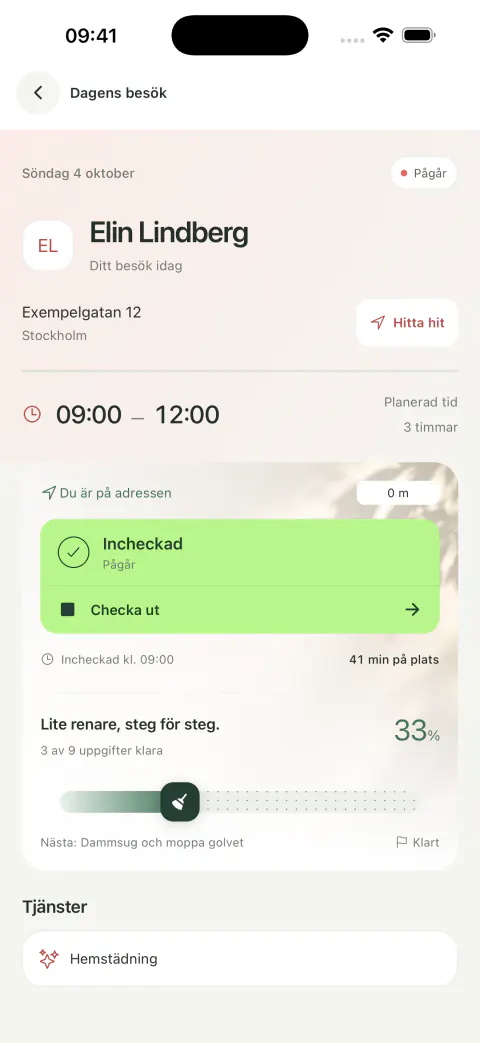
The employee checks in at the start and checks out when work is done, directly on the job.
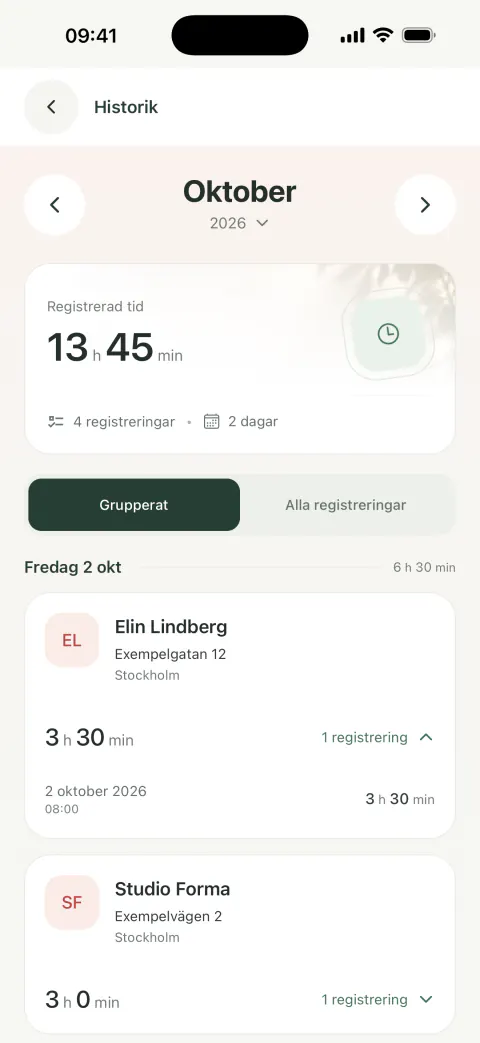
Employees can see their recorded working hours and return to past visits in the history view.
See today’s visits with addresses and planned times. Open the job when it’s time to begin.
The employee checks in at the start and checks out when work is done, directly on the job.
Employees can see their recorded working hours and return to past visits in the history view.
Mobile app screenshots with sample data. No real time is recorded.
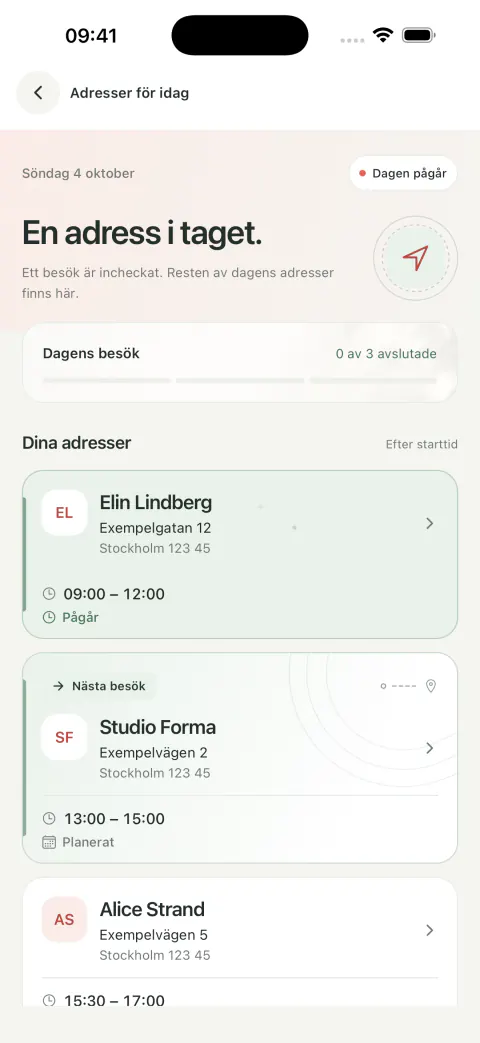
Today’s jobs, together on your phone. Check in and out directly on the job. Recorded time and past visits in your history.
Illustrated overview with fictional data. Reports are generated per employee.
From recorded time to payroll data
See start, finish and working time for each job. Select an employee and period for PDF or CSV, or continue in payroll management.
An authorized user can edit start and finish times in employee history. The duration is recalculated.
Check hours, breaks and payroll codes before approval. Approval applies to the payroll batch, not each individual clock-in.
Send approved attendance and absence with payroll enabled, a Fortnox connection with payroll permission and linked employees.
The GPS position is saved with check-in and check-out for the job.
Inform employees why location data is stored and who can access it.
Including Starter. Choose a plan by user count and see current prices and limits on the pricing page.
See plans and pricesThe employee opens their job in the mobile app, checks in at the start and checks out when work is done. Start and finish times are linked to the job.
Yes. A user with permission to edit service history can correct start and finish times in employee history. The duration is recalculated after the change.
You can review and approve the payroll batch before sending it to Fortnox Lön. Approval applies to the payroll batch, not a separate approval of every check-in and check-out.
Yes. Download PDF or CSV per employee and period. Direct transfer to Fortnox Lön requires payroll to be enabled, a Fortnox connection with payroll permission and linked employees. Then review, approve and send attendance and absence.
The job’s planned break is carried into the time report. In payroll, choose whether the break is paid or unpaid. Unpaid breaks are deducted when the payroll batch is prepared.
No. In payroll, you allocate hours to categories such as additional hours, overtime and unsocial-hours supplements using the appropriate payroll codes. Wisegent does not automatically classify overtime based on your collective agreement.
Yes. Location is recorded with check-in and check-out for the job. Inform employees about the purpose of the location data and who can access it.
Yes. Select an employee and a date range to generate a time report. You can download it as PDF or CSV.
Yes, mobile time reporting is included in every plan, including Starter. Plans have different user limits and prices. Fortnox Lön requires a connected integration with payroll permission.
Contact us and tell us how you work today. We’ll show you the workflow and help you see how time reporting could fit your team.
Explore Wisegent with us
We’ll show you check-in, corrections and payroll data. Tell us how you work and we’ll go through what your team needs.
Talk to usA conversation about your day. No obligation.
We use cookies
Cookies for analytics and marketing. Privacy policy
We use cookies for analytics and marketing (Google Analytics, Facebook Pixel). These cookies are only activated if you accept. Privacy policy